Sunday, January 15, 2023

Sharing 360° video?

So, you've got a 360 degree video file from your GoPro. What to do with it?
Well, share it on YouTube.

YouTube supports uploading and playback of 180° or 360° spherical videos on computers in Chrome, Firefox, MS Edge, and Opera browsers. You can also watch 180° and 360° videos on YouTube app or on the YouTube VR app available on most VR headsets.

The following guide works for MacOS.

Step 1a. Using the GoPro Player, Export the .360 file to .mov - this step utilises GoPro's World Lock & horizon Level & Mount Optimisation stabilisation processor. Settings in the screenshot below.
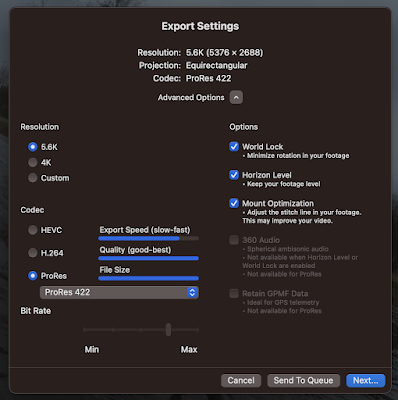
Optional Step 1b. If you have a sequence of .mov files use QuickTime to join them into one (file names number in order sequence - e.g. 01.mov, 02.mov, 03.mov) by opening the first .mov in QuickTime then dragging the remaining files onto the open QuickTime window, which then shows them in sequence and offers to join/merge them by clicking "done"), then export it to a new file .mov at 4k H.264.


Step 2. Using Handbrake export to mp4 format (do this to generate a much smaller file).

Step 3. Create a 360 degree aware version of the mp4 file via the Spatial Media Metadata Injector. This generates a file that contains 360 degree metadata so that it can be played in immersive mode by video players that support 360 degree viewing.

Step 4. Publish as normal via YouTube.

Notes:

Google's instructions here.
https://support.google.com/youtube/answer/6178631?hl=en

I followed migiguser's very good step through here.
https://www.youtube.com/watch?v=vQI3gxC9Ykc

You can find Handbrake here.
https://handbrake.fr

The Spatial Media Metadata Injector can be found on Github here.
https://github.com/google/spatial-media/releases/tag/v2.0

Sample video of a training row with OCBC on Sun 15 Jan 2023 - the second upstream run. 
https://youtu.be/8E6TcQLYxpQ

This is a 360° video. Open the ink using a PC with one of the following web browsers: Chrome, Firefox, MS Edge, or Opera. You can also watch 180° and 360° videos on the YouTube app or on the YouTube VR app available on most VR headsets.

Even if just using a web browser (see above) you should be able to pan around the scene (i.e. see stuff that is off-screen and different points of view by using the pan button in the top left of the viewer. You should be able to rotate the view the WASD keys. You can also swipe through a video by clicking and dragging through the space.

Tuesday, January 10, 2023

Text trimming in Excel

For example, to extract text to the right of the first space character (" ") in a cell containing "first-name second-name".

 =RIGHT(B2, (LEN(B2) - FIND(" ", B2)))

Monday, January 9, 2023

Homebrew setup

Before you run Homebrew you need to install the MacOS Command Line Tools that come in Xcode. To do this, open the App Store, search for and install Xcode. This can take upwards of 30' or more.

The Homebrew web site has further information.

 https://brew.sh/

To install Homebrew from the command prompt (e.g. Terminal) - you will need sudo permission.

/bin/bash -c "$(curl -fsSL https://raw.githubusercontent.com/Homebrew/install/HEAD/install.sh)"
==> Checking for `sudo` access (which may request your password)...
Password:
==> This script will install:
/opt/homebrew/bin/brew
/opt/homebrew/share/doc/homebrew
/opt/homebrew/share/man/man1/brew.1
/opt/homebrew/share/zsh/site-functions/_brew
/opt/homebrew/etc/bash_completion.d/brew
/opt/homebrew
/etc/paths.d/homebrew

The install script will take 10' or so to download packages, install and configure as per...

==> Next steps: n.b. change <loginid> to your ID
- Run these commands in your terminal to add Homebrew to your PATH:

    echo >> /Users/<loginid>/.bash_profile
    echo 'eval "$(/opt/homebrew/bin/brew shellenv)"' >> /Users/<loginid>/.bash_profile
    eval "$(/opt/homebrew/bin/brew shellenv)"

- Run brew help to get started
- Further documentation:
    https://docs.brew.sh

- two commands to add Homebrew to your PATH in ~/.zprofile:


echo 'eval "$(/opt/homebrew/bin/brew shellenv)"' >> ~/.zprofile
eval "$(/opt/homebrew/bin/brew shellenv)"

---------------------

How to install graphviz (not via https://graphviz.org)

brew install graphviz

which dot
/opt/homebrew/bin/dot

homebrew rename

To remove first 5 characters from bunch of file names...

From a terminal 

brew install rename

You can use the following command when you are in the folder where you want to make the renaming:

rename -n -v  's/^(.{5})//' *

-n is for no action and -v to show what will be the changes. If you are satisfied with the results you can remove both of them, e.g.

rename 's/^(.{5})//' *

To remove the first 14 characters including spaces of the names of files/folders in the current folder...

rename -n -v  's/^(.{14})//' *

(credit: armtatoo on https://stackoverflow.com)


rename stopped working with ""


Press 'q' to close or escape from 'less' in the terminal window? AKA exit the 'less' command and return to the shell.

How to edit a file from the command line Mac OS X?

sudo vi filename

The following commands will be useful... ESC followed by ':q' to quit or ':quit!' to force quit

for more tips on using vi review https://www.eng.buffalo.edu/~yearke/unix/vi12.shtml

Saturday, August 27, 2022

AI art by MidJourney and others...

First, read the article "AI-generated art illustrates another problem with technology" by John Naughton  on the Guardian (20 Aug 2022).

So what credit source acknowledgement is required if you want to use AI art generated by MidJourney?
Image Credits: MidJourney under a CC BY 4.0 license.

The important bit, licensing terms as of today (27 Aug 2022) as excerpted from https://midjourney.gitbook.io/docs/billing

Commercial Terms
You basically own all Assets you create using Midjourney’s image generation and chat services. This does not apply if you fall under the exceptions below. See Terms of Service for full details.
Exception 1: Non-Paid Members License Terms
If you are not a Paid Member, Midjourney grants you a license to the Assets under the Creative Commons Noncommercial 4.0 Attribution International License (the “Asset License”).

"...which means that you’d be able to use the images as long as you don’t sell them or make money off them, and as long as you give credit (“attribution”) to Midjourney." Haje Jan Kamps (@Haje TechCrunch 09 Aug 2022)

So there you have it. For more thoughts on the implications for using AI 'art' in the article on TechCrunch (link - https://techcrunch.com/2022/08/09/copyright-law/)


To view your collection of generated images use your discord login to https://www.midjourney.com/app/ 

Some starting 'prompts'

/imagine sketch navigation chart islands monsters treasure old 
(produced link)

Refresh 
(produced link)

Check MidJourney's User Manual for tips on prompts
And look for others' examples on the Midjourney Discord.
"monastary carved into a massive tree, ancient asian mountain monastary, red roofs, extremely detailed, symmetrical, proportionate, octane render, unreal engine 5 --ar 1024:2048 --q 3"

An example of a game developer that uses MidJourney generated art (link)

"sailing ship and "angry kraken" ocean storm"

AI art generators
Midjourney - Runs via Discord.
Hotpot is an AI driven multi-service platform, used for graphics, writing, image correction, and more.
NightCafe bills itself as a premium creation platform with a print on demand offering.
DALL·E. - First get on the waitlist - if/when you are approved then link to your Discord
DeepAI - 

AI generated audio noise mimicking music...
OpenAI's Jukebox
TechCrunch article on how OpenAI and other AI audio generators are dealing with copyright and licensing (link)
A useful article on the legal implications (link)
And An OpenAI researcher stating on Twitter that they (OpenAI) are not claiming copyright over the samples generated, and that such works may be publishable under copyright Fair Use provisions (link).

The OpenAI software is made available under a non-commercial license... 
...but what about the works generated? (audio output and lyrics)

The last section is the funniest - in the style of Katy Perry "Open A. I., Open A. I., on a mission to build safe A. I."
https://jukebox.openai.com/songs/788154229
** best https://jukebox.openai.com/songs/787872244

Thursday, January 6, 2022

Simple halftone image generator

 https://www.picturetopeople.org/image_effects/photo-halftone/halftone-image-generator.html


Friday, August 21, 2020

Simple stop motion video using stills and Final Cut Pro

For a simple stop motion video using stills and Final Cut Pro just follow the steps on Instructables

https://www.instructables.com/id/Create-a-movie-from-stop-motion-frames-in-Final-Cu/

Thursday, August 13, 2020

The power of ffmpeg

Editing Recordings (on Mac OS)

ffmpeg comes with homebrew https://brew.sh/. Install brew and then use brew to install useful packages.
brew install ffmpeg
or if you have a python distribution installed you can use pip
pip install ffmpeg
The zeroth step... you probably should install Xcode (sadly Xcode is massive and uses up to 20GB of disk).

The man page contains descriptions of commands
$ man ffmpeg

Example: Extract audio from a video (mp4) quicktime file.

Using QuickTime Player. File > Export
From the menu choose Audio Only. Name the file and click Export. The file will be exported as a 256kbps AAC audio file (m4a). A selection converting mp4 or m4a files to mp3 from the command line...
ffmpeg -i input.mp4 output.mp3

ffmpeg -i input.m4a output.mp3 
m4a is an Apple format, lossless compression. mp3 is the most common audio format, lossy compression.

Example: Converting and manipulating video formats like mov and mp4

Screen capture using QuickTime and manipulate with Trim (in QuickTime) and ffmpeg (from the command line)
ffmpeg -i EpicKartJump.mov EpicKartJump.mp4
Is it possible to speed up a video? https://video.stackexchange.com/questions/18469/is-it-possible-to-speed-up-a-video-using-handbrake
ffmpeg -i EpicKartJump.mov -vf "setpts=(PTS-STARTPTS)/10" -crf 18 EpicKartJumpFast.mp4
Example (best): How to join an audio file (mp3) with a video file (mp4)?
ffmpeg -i video.mp4 -i audio.mp3 -c:v copy -c:a copy output.mp4 

Note: the syntax is -i for input file, -c:v copy; for convert video, in this case 'copy' means no stream format conversion, it just copies; -c:a copy; and to convert audio -c:a aac would convert the audio file to aac format.

Example: To remove audio track from mp4 video file

ffmpeg -i input_file.mp4 -an -vcodec copy output_file.mp4

Example (?): To join multiple files into a single file (can be audio or video)

ffmpeg -i "concat:audio1.mp3|audio2.mp3|audio3.mp3" -c copy output.mp3

or 

ffmpeg -f concat -safe 0 -i FileList.txt -c copy mergedVideo.mp4 

Where FileList.txt contains paths in the local dir, something like:

file 'FirstFileInSequence.mp4'
file 'SecondFileInSequence.mp4'

Example: To speed/timelapse the video

ffmpeg -i input.mp4 -filter:v "setpts=0.5*PTS" output.mp4
Example: To slowmo the video
ffmpeg -i input.mp4 -filter:v "setpts=2*PTS" output.mp4
Example: To add blur effect to video
ffmpeg -i intro.mov -vf "boxblur=5:1" intro-blur.mov

Example: ffmpeg can make mp4 smaller by varying the Constant Rate Factor, using:

ffmpeg -i $infile -vcodec libx264 -crf 23 $outfile

Example (best): fmpeg can make mp4 smaller by changing the video screen-size (for example to half its pixel size), using:

ffmpeg -i $infile -vf "scale=iw/2:ih/2" $outfile

Friday, April 24, 2020

Writing NFC tags

In this example we want to write NPCs for Animal Crossing to an NFC tag which will be read by Animal Crossing in-game on the Nintendo Switch console.

Requirements:
Android device + file system viewer for Android
1x blank NTag215 card
1x NFC writer software
1x NFC dump zip file, unzipped on Android device

Procedure:
Use the NFC writer software to prep NTag215 card
Unzip the NFC dump zip file to a folder on the Android device
Use the NFC writer software to open selected files
Use the NFC writer software to copy to blank NTag215 card
Scan/read NTag215 card in Animal Crossing in-game on the Nintendo Switch console.

Sunday, April 12, 2020

Thesis Template using Word + Zotero

Requirements:

Cover page for all written work

The Thesis must have a cover page that includes the following clearly displayed information:
Title
Name of Student
Student Number
Degree programme
Supervisor
Date of submission (see deadline in Key Dates table) All pages (except the cover page) should be numbered.

Sections of the paper to be

Summary
Introduction
Materials and Methods
Results
Discussion
References

In-text Citations and the Bibliography (i.e. References section)

Paper to use referencing and citation style consistent with OIKOS Journal standard

Zotero group and shared library

Q: How to move from Google doc to Word while preserving zotero references?
A: https://www.zotero.org/support/kb/moving_documents_between_word_processors
Q: How to insert page numbers into the citation with zotero?
A: Click on the citation entry (blue) in-tool to activate the options panel for that citation (illustration below). Enter key on keyboard to process the entry.
Zotero citation options in action
Q: Can zotero automatically apply `ibid' to successive references to the same citation?
A: No, but you can replace the text to suit. However this disconnects the entry from zotero and it will not have successive updates applied (e.g. switching to another reference style).  See the help page for more detail https://www.zotero.org/support/word_processor_plugin_usage

Monday, April 6, 2020

Satellite surveys for sustainable ecosystems

detecting puffin poo from space in order to track bird colonies, nest site occupation and extent, occupation use, population viability growth or collapse. Also see mapping guano from space.

An article that discusses the background to the need for this kind of research - https://www.nationalgeographic.com/news/2014/8/140827-seabird-puffin-tern-iceland-ocean-climate-change-science-winged-warning/


Is it possible to use satellite imaging for detecting and surveying bat habitats and flyways from space?

How is satellite imaging used for mapping bird migration routes and correlation with en-route recovery habitats, forest and wetlands?

Correlating areal photography, satellite imaging, with ground survey to measure bog extents, health and regeneration.

Mapping connected terrestrial ground cover, wetlands, wilderness and forest habitats from space.
Identifying disconnected habitats, mapping micro to macro fragmentation of biosphere due to human barrier interventions from paths to roads, walls, through to cities and mega engineering projects.

Detecting greenhouse gas emission sources. Remote detection of environmental methane outgassing events and satellite observations of ground based methane sources from industrial sites.

Articles discussing this topic:
https://visibleearth.nasa.gov/images/88245/imaging-a-methane-leak-from-space
https://www.forbes.com/sites/scottcarpenter/2019/11/27/detection-of-methane-leak-from-space-could-herald-a-revolution/
https://www.nytimes.com/2019/12/16/climate/methane-leak-satellite.html

Monday, January 28, 2019

New to MATLAB

Notes from a MATLAB newbie:

Notes on the CORE Project

The website: https://www.core-econ.org/
Text books:
  • The Economy - Free, open access, introductory text targeting undergraduate learning ...more
  • Economy, Society, and Public Policy - Free, open access text that uses policy problems to motivate learning the concepts and methods of economics ...more
  • Doing Economics: Empirical Projects - Exercises with real source data for working through policy problems ...more
Part 1.1 The behaviour of average surface temperature over time
R Studio orientation (youtube link)
DataCamp's R tutorial series (youtube link)
Q 1. Why measure temperature as 'anomalies' rather than as absolute values? The use of 'anomaly' measure focuses attention on 'difference' rather than the amount. Absolute values will vary from place to place. Calculations can be swamped by intrinsically large constant component of absolute values (analogous to mantissa and exponent of floating point numbers). Anomalies will tend to agree in time and extent if a global change occurs (both the hot and the cold will get a little hotter, or a little colder in tandem).

Import the data file into R.
A csv file is a 'flat file' and is easily imported in R as a 'data frame'.
The utils package is loaded by default.
Use read.csv() - this function handles typical default values corresponding the usual way that csv files are laid out (i.e. with header = TRUE etc)

> tempdata <- read.csv("NH.Ts+dSST.csv", skip=1, na.strings = "***")

Monday, May 21, 2018

models for managing - tools


  • Belbin's team roles model for group work.
  • Brainstorming (vocal)
  • Brain writing (silent) - aka Crawford slip idea capture.
  • Bubble sort (manual) - pairwise swap, most valuable bubble up.
  • CAR : Causal Analysis and Resolution - an area from the CMMI; a document for planning and capturing audit of a 'practice area'
  • CMMI - in fact a framework, an entire philosophy, structure and suite of tools
  • Entity relationship diagram (ERD)
  • Facts (blue), opinions (yellow), assumptions (pink)
  • Fishbone diagram (linear, cause-effect, event-consequence-response)
  • Five Forces: threat of new entrants, threat of substitutes, bargaining power of customers, bargaining power of suppliers, industry rivalry
  • How how diagram (action tree)
  • Mindmap
  • Nominal group method (anonymous voting)
  • PESTLE analysis : political, economic, social and technological influences on business.
  • Relations diagram (free-form nodes, connections, directions)
  • Relations (chain, cycle/circle, source/origin, stock/sink, network).
  • Six Thinking Hats method : Edward de Bono's approach for lateral, creative, brainstorming. 
  • SWOT : strengths, weaknesses, opportunities and threats.
  • Technological, Organizational, and Environmental (TOE) framework
  • Tree diagram (top-down, bottom-up, star, comb, left-right, right-left)
  • Value chain mapping of top-line (primary) and bottom-line (support) activities/processes. Examples of primary value adding processes might include: sourcing, receiving storing and processing raw materials; making the product/service; marketing, selling, delivering, maintaining. Examples of value supporting processes might include: general management; accounting; human resources management, finance capability; building and facilities; purchasing; R&D functions.
  • VER : Verification - an area from the CMMI; a document for capturing verification of an audit area
  • VRIO : Value, Rarity, Imitability, Organization.
  • Why why diagram (problem tree)


Monday, February 26, 2018

Writing Exercise (I & II)

(an exercise working from 'writing prompts')

The purpose of my paper is...

The audience for my paper is...

I ask...

What does it mean when...?

I use...

...is an interesting problem!

The major contribution of my paper is...

The main argument in my paper is...

My key contribution is...

My <one, two, three...> key arguments are...

There is a gap in the literature on...

This paper will be particularly useful for...

This is important because...

I want to...

Analysis discussion questions...

That's odd

What we didn't expect to find was...

The situation/claim/data is puzzling.

I was puzzled by...

I didn't expect to find...

It is interesting because we can now...

It is impactful because we will be able to...

Counter-intuitively we found that...

Contrary to what we expected we found that...

Wednesday, March 29, 2017

SWOT analysis of BotW/Switch

(The following sections and points to be expanded into essay format)

Strengths (& what it does well, what it does right)
It has a really good story. Each of the titles take the world in slightly different directions. Players discuss how to reconcile multiple storylines but the technicalities of if/when/where each gameworld fits within a canonical timeline aren't as interesting as thinking about some of the deeper meanings that can be read into the game designs. For example, players have posited the design themes in Majora's Mask in terms of Grief Theory (link).
The character concepts and "worlding" are deeply interesting and clearly leave gaps for interpretation and discussion about world connections, time and timelines, characters and relationships between titles in the Zelda series.
Content draws on previous titles, making good use of pre-existing assets but developing them further in interesting ways.
Appeal to both male and female players.
Numerous interesting and challenging side-quests.
Some gameplay elements offer excellent collection appeal (costumes, parts, weapons etc.) and dynamics.
Excellent balance of difficulty, skill, ability progression within the one game.
Progression and difficulty intertwined with the game concept.
Deep background and history progressively introduced.
Historical figures progressively injected into game environment.
The launch title with new Nintendo consoles (which ones?). Typically bought separately, not bundle priced, it maximised revenue potential from customers who set a high value on the title franchise.
Nintendo, the title (and the platform ecosystem) is perceived to be child-friendly in a field (computer gaming) that is dominated by adult content.
The youth market can be effective activators of gate keepers with purchasing power (children's pester power).

Weaknesses (& what hasn't gone well)
Novelty will wear off.
Single player mode only.
The game concept has no opening for multiplayer, cooperative or competitive.
The game concept has one main narrative, i.e. cannot play as the bad guys.
Tightly linked to Nintendo platforms.
Platform weaknesses (if any) may transfer to the game itself.
Player intention to continue (playing) may/will diminish over time.
Grinding repetition as player levels up (hearts, stamina etc.)

Opportunities (& expansion, might also be threats)
New versions can be released to incrementally enhance the game, content, gameplay, narrative structure and goals.

Threats (might also be opportunities?)
Content that opens up as players explore the game, level-up etc. may be construed as anti-ethical to the child-friendly platform concept.
Unforeseen hardware faults.
Competition from mobile devices.
Late to market.

Recommendation (should be compelling, a call to action, arguments based on research)
Focus on quality.
Focus on gameplay.
Focus on integrity of game narrative.
Downloadable content to introduce incremental enhancements at low price or for free to reinforce customer satisfaction with the hardware platform and the game.
Enhance revenue from hardware/software ecosystem through the game shop to cross-promote other titles that leverage network effects (e.g. co-op games like Splatoon 2).

Thursday, March 23, 2017

Preparing a manuscript for...

Preparing a manuscript for AIS Conferences...

International Conference on Information Systems (ICIS)
ICIS 2020 Hyderabad, India, December 13-16 (link) - see github for a latex template
2 in UCD OBRSS listing 2018 (2-1)
Not included in Harzing (2017)

Hawaii International Conference on Systems Sciences (HICSS)
HICSS 2019 (link) - overleaf for a latex template
1 in UCD OBRSS listing 2018 (2-1)
Not included in Harzing (2017)

Preparing a manuscript for Emerald

The Learning Organization: The International Journal of Critical Studies in Organizational Learning (link)
2 in UCD OBRSS listing 2018 (2-1)
Not included in Harzing (2016)

Preparing a manuscript for Springer Palgrave MacMillan

Journal of Information Technology (link)
2 in UCD OBRSS listing (2-1)
Position in Harzing (2016): 3 in Ejis 2007 (4-1); 2 in EjisCI 2007 (4-1); 4 in UQ 2007 (1-5); 3 in Ast 2008 (4-1); A in Wie 2008 (A+-A); 2 in Den 2011 (2-1); B+ in HEC 2011 (A-C+); 1 in UQ 2011 (1-4); B in Aeres 2012 (A-C); 3 in Cra 2012 (4-1); A* in Abdc 2013 (A*-C); 2 in Fneg 2013 (1*-4); 3 in ABS 2015 (4*-1); 3 in Cnrs 2015 (1*-4); A in Vhb 2015 (A+-E); 1 in Ess 2016 (0+-3); p* in EJL 2016 (P*-S);

Journal of Information Technology Teaching Cases (JIT's associated case journal) (link)
1 in UCD OBRSS listing (2-1)
Not included in Harzing (2016)

International Journal of Technology and Design Education (link)
2 in UCD OBRSS listing (2-1)
Not included in Harzing (2016)

Preparing a Manuscript for Routledge Taylor & Francis

**European Journal of Information Systems (link)
1 in UCD OBRSS listing (2-1)
Position in Harzing (2017): 3 in Ejis 2007 4-1; 2 in EjisCI 2007 4-1; A in Wie 2008 A+-A; A in HEC 2011 A-C+; 1 in UQ 2011 1-4; 3 in ABS 2015 4*-1; A in Vhb 2015 A+-D; A* in Abdc 2016 A*-C; 1 in Ess 2016 0+-3; P in EJL 2016 P*-S; 1 in Fnege 2016 1*-4; 1 in Cnrs 2017 1*-4; 2 in Den 2017 2-1; A in Hceres 2017 A-C; 

Scandinavian Journal of Educational Research (link)
2 in UCD OBRSS listing (2-1)
Not included in Harzing (2016)

Assessment & Evaluation in Higher Education (link)
2 in UCD OBRSS listing (2-1)
Not included in Harzing (2016)

Teaching in Higher Education (link)
1 in UCD OBRSS listing (2-1)
Not included in Harzing (2016)

The Curriculum Journal (link)
2 in UCD OBRSS listing (2-1)
Not included in Harzing (2016)


Preparing a Manuscript for Elsevier

First, read the author guidelines.
Next, review Elsevier's "LaTeX instructions" pages (link)
For reference you will need to consult Elsevier's guide to elsarticle.cls

Journal of Information Systems Education (link)
1 in UCD OBRSS listing (2-1)
Position in Harzing (2016): 4 in UQ 2007 (1-5); 1 in Den 2011 (2-1); 4 in UQ 2011 (1-4); B in Abdc 2013 (A*-C); 1 in ABS 2015 (4*-1); 3 in Ess 2016 (0+-3)

British Journal of Educational Technology (link)
2 in UCD OBRSS listing (2-1)
Position in Harzing (2016): 2 in Ejis 2007 (4-1); 2 in EjisCI 2007 (4-1); 3 in Ast 2008 (4-1), 1 in Den 2011 (2-1); A in Abdc 2013 (A*-C); 2 in ABS 2015 (4*-1)

Computers and Education (link)
2 in UCD OBRSS listing (2-1)
Not included in Harzing (2016)

International Journal of Educational Research (link)
2 in UCD OBRSS listing (2-1)
Not included in Harzing (2016)

**Design Studies (link)
2 in UCD OBRSS listing (2-1)
Not included in Harzing (2017)


Preparing a manuscript for Sage

Ethnography (link)
2 in UCD OBRSS listing (2-1)
Not included in Harzing (2016)

Journal of Management Education (link)
1 in UCD OBRSS listing (2-1)
Position in Harzing (2017): 3 in UQ 2011 (1-4); 2 in ABS 2015 (4*-1); B in Vhb 2015 (A+-D); B in Abdc 2016 (A*-C)
Position in Harzing (2016): 4 in UQ 2007 (1-5); 1 in Den 2011 (2-1); 3 in UQ 2011 (1-4); 2 in Cra 2012 (4-1); B in Abdc 2013 (A*-C); 2 in ABS 2015 (4*-1); B in Vhb 2015 (A+-E)

Simulation & Gaming (link)
1 in UCD OBRSS listing (2-1)
Not included in Harzing (2016)

**Organization (link)
2 in UCD OBRSS listing (2-1)
Position in Harzing (2017) Ejis 2007 4-1 (3), EjisCI 2007 4-1 (3), Wie 2008 A+-A (A), HEC 2011 A-C+ (nil), UQ 2011 1-4 (2), ABS 2015 4*-1 (3), Vhb 2015 A+-D (B), Abdc 2016 A*-C (A), Ess 2016 0+-3 (1), EJL 2016 P*-S (S), Fnege 2016 1*-4 (2), Cnrs 2017 1*-4 (1), Den 2017 2-1 (2), Hceres 2017 A-C (A)

**Organization Studies (link)
2 in UCD OBRSS listing (2-1)

Position in Harzing (2017) 3 in Ejis 2007 4-1; 3 in EjisCI 2007 4-1; A in Wie 2008 A+-A; B+ in HEC 2011 A-C+; 1 in UQ 2011 1-4; 4 in ABS 2015 4*-1; A in Vhb 2015 A+-D; A* in Abdc 2016 A*-C; 0 in Ess 2016 0+-3; P* in EJL 2016 P*-S; 1 in Fnege 2016 1*-4; 1 in Cnrs 2017 1*-4; 2 in Den 2017 2-1; A in Hceres 2017 A-C;


Management Learning (link)
2 in UCD OBRSS listing (2-1)
Position in Harzing (2017) Ejis 2007 4-1 (2), EjisCI 2007 4-1 (2), Wie 2008 A+-A (nil), HEC 2011 A-C+ (B), UQ 2011 1-4 (3), ABS 2015 4*-1 (3), Vhb 2015 A+-D (B), Abdc 2016 A*-C (A), Ess 2016 0+-3 (2), EJL 2016 P*-S (S), Fnege 2016 1*-4 (2), Cnrs 2017 1*-4 (3), Den 2017 2-1 (2), Hceres 2017 A-C (A)


Preparing a manuscript for MIT Press

**Design Issues (link)
2 in UCD OBRSS listing (2-1)
Not included in Harzing (2017)

References

  • [Harzing, 2016] Harzing, A. (2016). Journal quality list. Technical report.
  • The UCD OBRSS Channel_list.xls

Saturday, December 31, 2016

Writing a graphic element: exercise

Simulating hand-drawn elements topic on StackExchange
Writing a graphic element using TikZ and PGF:

\documentclass{article}
\usepackage{tikz}
\usetikzlibrary{arrows.meta} %to get different arrow tips
%%%<
\usepackage{verbatim}
\usepackage[active,tightpage]{preview}
\PreviewEnvironment{tikzpicture}
\setlength\PreviewBorder{5pt}%
%%%>
\begin{comment}
:Title: LearningTikz
:Tags: examples
:Author: Me
:Slug: Tutorials
Following CreÃŒmer_MinimalTikz_2011.pdf
Note default units are centimetres - scale command overrides for output.
Alternatively go to the command line window and type texdoc pgf and choose pgfmanual.pdf if needed from list if it appears.
\end{comment}
\usetikzlibrary{positioning}

\begin{document}
\begin{tikzpicture}[scale=1]
%\begin{tikzpicture}[xscale=2.5,yscale=0.5] % alternate scaling options.
\draw[help lines] (0,0) grid (2,3);
\draw (0,0) -- (1,2) -- (2,3) -- (1,0);
\draw (0,3) -- (1.5, 0.5);
%axes decorations
\draw [<->] (0,3) -- (0,0) -- (2,0);
%decorations on line ends
%can also use thickness commands
%ultra thin, very thin, thin, semithick, thick, very thick and ultra thick 
%and [help lines] to highlight special points
%and [line width= 0.2cm] or [line width= 12] for pt or point widths
%and [dashed], or dotted
%and colours like [red] etc.
\draw [->, ultra thick, red] (0, -0.1) -- (2, -0.1);
\draw [ultra thin, dotted, <-] (0, -0.2) -- (2, -0.2); 
\draw [|->, dashed] (0, -0.3) -- (2, -0.3);
\draw [yellow, line width=6]   (0,0) -- (.5,0);

\end{tikzpicture}

\begin{tikzpicture} 
\draw [yellow, line width=6]   (0,0) -- (.5,0);  
\draw [blue] (0.1,0.1) rectangle (1.6,1.1);
\draw [red, ultra thick] (2.2,0.6) circle [radius=0.5];;
\draw [gray] (4,0.1) arc [radius=1, start angle=45, end angle= 120];
\draw [<->, rounded corners, thick, purple] (0,2) -- (0,0) -- (3,0);
\end{tikzpicture}

\begin{tikzpicture}[xscale=1,yscale=1]
\draw [help lines] (0.6,1.34) -- (0.6,1) -- (1.05,1);
\draw[help lines] (0,0) grid (2,2);
\draw[orange] (0.6, 1.0385) --
(0.61, 1.06372) -- (0.62, 1.08756) -- (0.63, 1.11012) -- (0.64,
1.13147) -- (0.65, 1.15166) -- (0.66, 1.17074) -- (0.67, 1.18874) -- (0.68,
1.20568) -- (0.69, 1.22157) -- (0.7, 1.23643) -- (0.71, 1.25026) -- (0.72,
1.26307) -- (0.73, 1.27486) -- (0.74, 1.28561) -- (0.75, 1.29534) -- (0.76,
1.30402) -- (0.77, 1.31165) -- (0.78, 1.31821) -- (0.79, 1.32369) -- (0.8,
1.32806) -- (0.81, 1.33131) -- (0.82, 1.3334) -- (0.83, 1.33431) -- (0.84,
1.334) -- (0.85, 1.33244) -- (0.86, 1.32956) -- (0.87, 1.32533) -- (0.88,
1.31966) -- (0.89, 1.3125) -- (0.9, 1.30373) -- (0.91, 1.29325) -- (0.92,
1.2809) -- (0.93, 1.26649) -- (0.94, 1.24976) -- (0.95, 1.23032) -- (0.96,
1.2076) -- (0.97, 1.18065) -- (0.98, 1.14763) -- (0.99, 1.1038) -- (0.991,
1.09836) -- (0.992, 1.09261) -- (0.993, 1.0865) -- (0.994, 1.07994) -- (0.995,
1.07282) -- (0.996, 1.06497) -- (0.997, 1.0561) -- (0.998, 1.04563) -- (0.999,
1.03209) -- (0.9991, 1.03042) -- (0.9992, 1.02866) -- (0.9993,
1.02679) -- (0.9994, 1.02478) -- (0.9995, 1.0226) -- (0.9996, 1.02019) -- (0.9997,
1.01747) -- (0.9998, 1.01424) -- (0.9999, 1.01005) -- (0.9999,
1.01005) -- (0.99991, 1.00953) -- (0.99992, 1.00898) -- (0.99993,
1.0084) -- (0.99994, 1.00778) -- (0.99995, 1.0071) -- (0.99996,
1.00634) -- (0.99997, 1.00549) -- (0.99998, 1.00448) -- (0.99999, 1.00317) -- (1,
1) ;
\end{tikzpicture}

\begin{tikzpicture}
\draw[help lines] (0,0) grid (2,2);
\draw[very thick] (0,0) to [out=90,in=195] (2,1.5);
\end{tikzpicture}

\begin{tikzpicture}
\draw[help lines] (0, -0.1) grid (4,1.1);
\draw [<->,thick, cyan] (0,0) to [out=90,in=180] (1,1)
        to [out=0,in=180] (2.5,0) to [out=0,in=-135] (4,1) ;
\end{tikzpicture}

\begin{tikzpicture}[xscale=2,yscale=2]
\draw [<->] (0,0.8) -- (0,0) -- (0.5,0);
\draw[green, ultra thick, domain=0:0.5] plot (\x, {0.025+\x+\x*\x});
\end{tikzpicture}

\begin{tikzpicture}[yscale=1.5]
\draw [help lines, <->] (0,0) -- (6.5,0);
\draw [help lines, ->] (0,-1.1) -- (0,1.1);
\draw [green,domain=0:2*pi] plot (\x, {(sin(\x r)* ln(\x+1))/2});
\draw [red,domain=0:pi] plot (\x, {sin(\x r)});
\draw [blue, domain=pi:2*pi] plot (\x, {cos(\x r)*exp(\x/exp(2*pi))}); 
\end{tikzpicture}

\begin{tikzpicture}[scale=0.5]
\draw [fill=red,ultra thick] (0,0) rectangle (1,1);
\draw [fill=red,ultra thick,red] (2,0) rectangle (3,1);
\draw [blue, fill=blue] (4,0) -- (5,1) -- (4.75,0.15) -- (4,0);
\draw [fill] (7,0.5) circle [radius=0.1];
\draw [fill=orange] (9,0) rectangle (11,1);
\draw [fill=white] (9.25,0.25) rectangle (10,1.5);
\end{tikzpicture}

\begin{tikzpicture}[>=stealth] %see Reference: Arrow Tips in pgfmanual.pdf
\draw [thick, <->] (0,2) -- (0,0) -- (2,0);
\node at (1,1) {yes};
\end{tikzpicture}

\tikz {
\shade [left color=white, right color=red!50] (0,0) rectangle (4,1);
  \draw [ultra thick,-{Circle[open]}] (0,4/5) -- ++ (3.5,0);
  \draw [ultra thick,-{Triangle[open]}] (0,3/5) -- ++ (3,0);
  \draw [ultra thick,-{Triangle[fill=white]}] (0,2/5) -- ++ (3,0);
  \draw [ultra thick, -{Arc Barb[reversed] }] (0,1/5) -- ++ (3,0);
  \draw [ultra thick, -{Rays[n=9]}] (0,0) -- ++ (2.5,0);
}

\begin{tikzpicture}
\draw [thick, <->] (0,2) -- (0,0) -- (2,0);
\draw[fill] (1,1) circle [radius=0.025];
\node [below] at (1,1) {below};
\node [above] at (1,1) {above};
\node [left] at (1,1) {left};
\node [right] at (1,1) {right};
\end{tikzpicture}

\end{document}

Thursday, November 24, 2016

APA Title Case Rule

From APA’s Style Blog:
  1. Capitalize the first word of the title/heading and of any subtitle/subheading;
  2. Capitalize all “major” words (nouns, verbs, adjectives, adverbs, and pronouns) in the title/heading, including the second part of hyphenated major words (e.g., Self-Report not Self-report); and
  3. Capitalize all words of four letters or more.

Monday, June 20, 2016

pgp gpg signatures and the like

PGP and GPG are, respectively:
  • Pretty Good Privacy, an open standard software design and architecture for encryption using the public key / private key model. (link)
  • GnuPG aka Gnu Privacy Guard, a Free Software / Open Source implementation of the PGP standard. (link)
The key to it all is key exchange. You may exchange keys in a number of ways:
  • By sending it via e-mail to a 'correspondence partner'. 
  • By publishing the key on a website for everyone to access.
  • By uploading a key to a keyserver.

Q: Someone has sent me an email and it has an attachment 'signature.asc' so that is that all about?
A: A dot '.asc' file simply indicates that the file contains plain (ASCII) text. An ASC file
  • A so-called 'inline armour' signature file '*.asc' is a static file containing a public key. 
  • A PGP/MIME signature file is a bit like a checksum, it is the result of a unique calculation based on the message content and the sender's PGP key. In this case the '.asc' file contains the output of a function that uses the original document content, the sender's private key, the time etc. This works by virtue of the fact that any particular digital file has a numeric/binary representation, basically a very long number, and can therefore have math performed on it.
Q: You visit a website and where each contact person includes a seemingly random string of 40 hexadecimal characters labelled 'GPG key' otherwise known as the 'fingerprint'.
A: A fingerprint links to a downloadable version of a public key, a file such as 'somefilename.asc' containing more random  letters and numbers e.g. file contents looking somewhat like the following
----BEGIN PGP PUBLIC KEY BLOCK-----
fall34saLKU877lkdkmQENBE8e3CIBCACeeMFj0mrmp66lKg4u1yBCxZLKd6gbjOjAW6JoCmIBemOnH3yR6f4XQwpO3wcvuK1NAyV6XvjN7kg/eRwjzjKr3Ro9k+l7kk2EuTSAwEX2rudWEXdr5OCFob6ag4osic8+jajM/VAFYw3S1tPW+Jmf8FddcpXyy9yeKsDYDYbFKUPOvNwoH2qHPY4wTVi2QcsDuaHjRCqi
-----END PGP PUBLIC KEY BLOCK-----


Q: Can you suggest basic exercises to follow to learn how to use PGP signing and encryption?
A: Try attaining the following goals in order of increasing difficulty...
  1. Install PGP / GPG or use webmail extension/add-on like Mailvelope (works for Chrome or Firefox only), you should then be able to verify other people's signatures and collect their public keys.
  2. Generate your own key files, and store them locally initially.
  3. Sign an email (doesn't encrypt the content) and send it to me (like I did above) so I can verify the signature.
  4. I think signing is also a way of sharing your public key via email. After which I should be able to encrypt something intended for you.
  5. Practice encrypting/decrypting
  6. Publish your public key on a key server to make accessing your public key easier.


Notes:

Using Mailvelope for in browser webmail (Chrome and Firefox).


Sharing 360° video?

So, you've got a 360 degree video file from your GoPro. What to do with it? Well, share it on YouTube. YouTube supports uploading and pl...